Pay your rates
On this page:
How can I pay my rates?
You can pay your rates in several ways. You can find the amounts owing, due dates and payment options on your rates notice, which you can expect to receive in August each year.
Pay your rates by Payble
Merri-bek City Council has partnered with Payble to help you spread your rate payments into flexible, manageable instalments that fit your budget and lifestyle.
Payble is an online payment platform that helps ratepayers manage their rates. It’s free, easy to set up and you can check your balance at any time. Plus if your circumstances change, you can login and adjust how often you pay.
Sign up to pay your rates via Payble by visiting pay.merri-bek.vic.gov.au
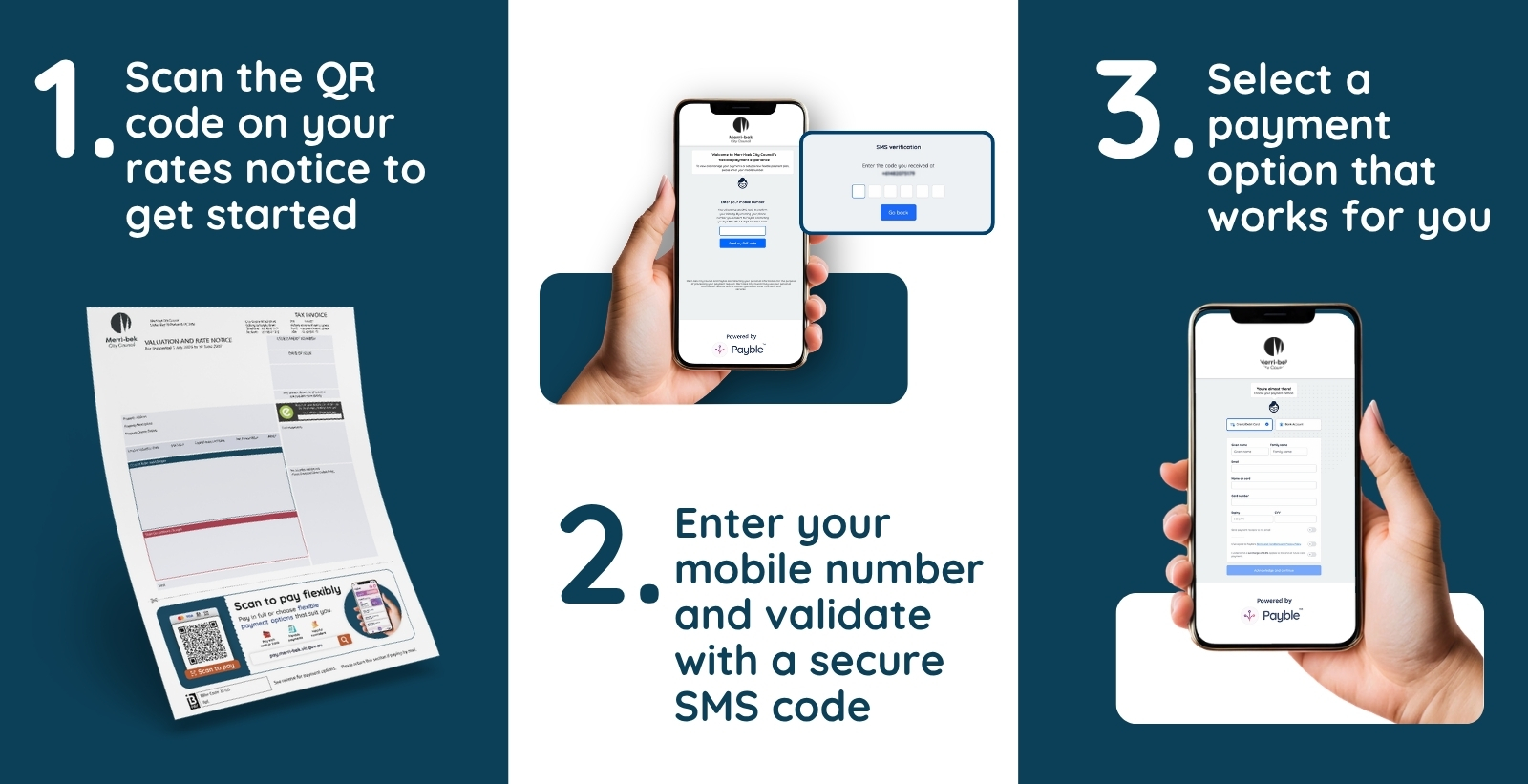
Payble lets you choose how and when you pay. You can choose to set up:
- A one-off payment
- Autopay - Set and forget - Pay in Full or Pay in Four - Schedule automatic payment of your current and future notices in full on 30 September or on their respective due dates.
- Flexible payments by due date and get ahead - Schedule weekly, fortnightly or monthly payments in advance of the due date. You can also choose to make regular payments to get ahead of your next notice. This option can ensure you are paid in full by EOFY.
- Request a Long term payment plan - Submit a request for weekly, fortnightly, or monthly payments that suit your budget to be considered by Council. Please note that should the plan take longer than 2 years to complete, evidence of hardship must be being provided, otherwise it is unlikely that the plan will be accepted.
Once Payble is set up
- You can pay using your Credit Card, Debit Card, or Bank Account
- You can make one-off payments, pay in full, or set up a weekly, fortnightly, or monthly payment schedule.
- Receive reminders for upcoming and overdue payments.
- You can check the balance owing at any time.
- When you receive your rates notice for the next year, a new payment plan will be calculated automatically.
Changes to the Direct Debit
Merri-bek has recently introduced a new, more flexible payment platform called Payble for rate payments.
As part of this change, new registrations for direct debit rate payments will no longer be available.
You can still pay your rates monthly or quarterly by switching to Payble. Payble offers flexible payment options, allowing you to pay weekly, fortnightly, monthly or quarterly, using your bank account or a debit or credit card.
To set up a Payble direct debit, simply scan the QR code on your Rates Notice or visit pay.merri-bek.vic.gov.au and enter the Assessment number on your Rate notice.
Direct debit options:
- to opt into the Quarterly direct debits, select the Auto Pay option.
- to opt into the Monthly direct debits, select the Flexible Payments option.
Pay your rates on our eServices website
You can pay your rates online on our eServices website. Payment can be made in full or in part. You will need the Assessment Number on your rates notice.
Pay your rates by BPAY
To pay your rates by BPAY, log in to your online bank account and select BPAY to pay bills online. Alternatively, call your phone banking number.
You will need to enter the biller code 35105, the Assessment Number found on the front of your rates notice, and the payment amount to complete the BPAY payment.
Centrepay
Customers can use Centrepay to make voluntary, regular deductions from their Centrelink payments. Go to servicesaustralia.gov.au/centrepay for more information. Contact Council to be provided our Centrepay number. Ensure you email a copy of your Centrepay application form to ratescontact@merri-bek.vic.gov.au
Pay your rates by phone
Call us on 03 9240 1111 and press ‘1’ to make a payment. Press ‘2’ to pay rates and follow the voice prompts. You will need your assessment number and your credit card details to make a payment.
Pay your rates by post
To pay by post you need to separate the payment slip at the bottom of your rates notice and mail it with your cheque or money order to Merri-bek City Council, Locked Bag 10, Brunswick VIC 3056, before the due date.
Make the cheque or money order payable to ‘Merri-bek City Council’ and cross 'Not negotiable'. Do not include cash in the mail.
A receipt is not provided for rates notices paid by mail. Make sure to keep the top section of the notice for your records.
Pay your rates in person
Bring your rates notice to on of our Customer Service Centres where you can pay by credit card, EFTPOS, cheque, money order. Cash (maximum of $3,000 per invoice) will only be accepted at the Coburg Civic Centre, 90 Bell St, Coburg or Brunswick Customer Service Centre, 233 Sydney Rd, Brunswick VIC 3056. You can find the locations of our Customer Service Centres on our Contact us page.
Pay your rates at a post office
To pay your rates at a Australia Post post office, bring your rates notice to a post office and you can pay by credit card, EFTPOS, cheque, money order, or cash.
When are rates due?
You can pay your rates and charges in alignment with the legislated quarterly instalments below.
Instalment due dates for 2026-27 rates
Instalment 1: 30 September 2026
Instalment 2: 30 November 2026
Instalment 3: 28 February 2027
Instalment 4: 31 May 2027
If the due date falls on a public holiday or weekend, the instalment can be made the next working day.
Can I pay my rates in full?
Merri-bek is an 'instalment only' Council, which means if you wish to pay in full you must pay by the 1st instalment due date, 30 September, as interest will be charged on any instalment considered overdue.
When will I receive my rates notice?
Rates notices and instalment reminder notices are sent to ratepayers by post and email. Rates notices are sent to all ratepayers in August each year. Instalment reminder notices are sent 14 days before each due date.
You can also send your rates notice to your online bank account by registering through ‘BPAY View’ or the ‘View Bills’ section in your account.
Register using the biller code 35105.
Opt-in to get your rates notices by email
Most rates notices are sent by mail, however you can opt-in to have your future rates notices sent by email instead.
You can request to have your future rates notices sent by email on our eNotices website. To make this request you need to sign up to the eNotices website and provide your most recent eNotices reference number. You can find this number in the bottom-right corner of your most recent rates notice.
Once you have requested your future rates notices to be sent by email you will no longer recieve a copy of your rates notice by post.
Sign up to receive rates notices by email
Have a question about your rates notice?
Fill out the form below if you have a question about your rates notice or need more information.
Please provide as much detail as you can. We will get back to you within 10 business days.
If you want to make a formal objection to your valuation, you can find out more about this on our Property valuations page.